> ## Documentation Index
> Fetch the complete documentation index at: https://hercules.app/docs/llms.txt
> Use this file to discover all available pages before exploring further.
# Hercules Files & Media
> Store images, videos, PDFs with CDN URLs. Upload, integrate into your app, and use image transformations.
Store and manage images, videos, PDFs, and any other file/media assets for your app. Every file gets a permanent CDN URL for fast loading anywhere in the world. For structured data use [Database](/apps/database).
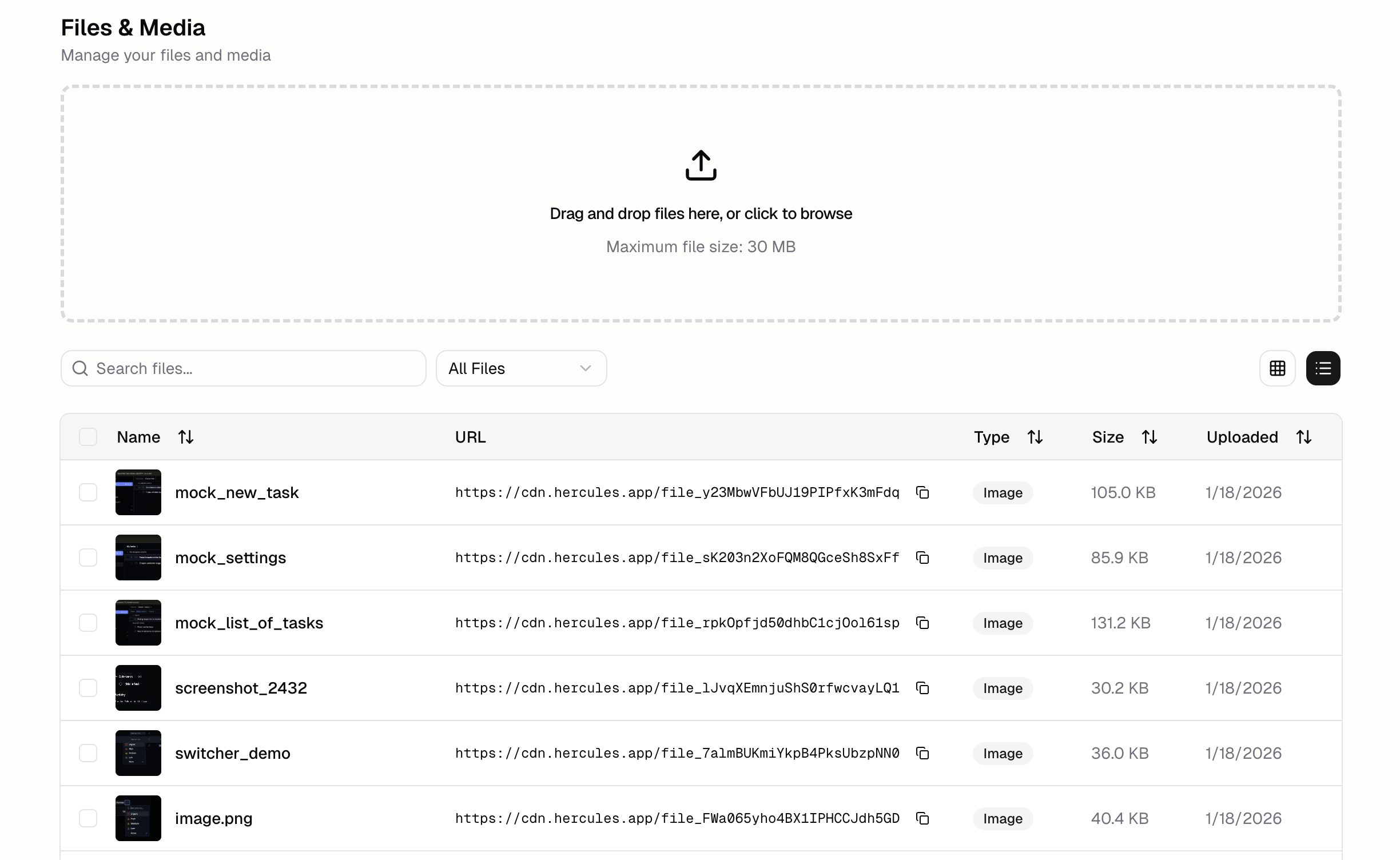
### How do I upload files?
1. Open **Files & Media** tab in the sidebar
2. Drag and drop files or click the upload button
Your files will upload then appear in your library with metadata and a CDN URL
### What's the URL for my file?
All files are accessible at a url like `https://hercules-cdn.com/`. File IDs always start with `file_` (e.g. `https://hercules-cdn.com/file_1234567890`).
The previous CDN URL format was `cdn.hercules.app`. If you see this old format in your app's code,
replace it with `hercules-cdn.com`. The old format is deprecated.
### How do I integrate files uploaded to Hercules Files & Media into my app?
You can ask Hercules to find files for you. e.g. `Add my logo from Hercules files and media to the
nav bar`
**Individual items**\
Copy the file URL from the Hercules Files & Media tab and paste it into the Hercules Chat
**Multiple items**
1. Use the checkboxes to bulk select the files/media you want
2. Click "Add to Chat"

### What file types are supported?
Everything! Popular ones include
* **Images:** PNG, JPG, GIF, SVG, WebP
* **Videos:** MP4, WebM, MOV
* **Documents:** PDF, DOC, DOCX, XLS, XLSX
* **Other:** Any file type can be stored and served.
### Are there any limits?
Currently the limits are:
| Plan | Storage | Upload Limit |
| ---------- | ------- | ------------ |
| Free | 50mb | 5mb |
| Pro | 2 GB | 30mb |
| Business | 20 GB | 30mb |
| Enterprise | Custom | Customer |
If you are on the Business plan and need more storage, please click "Support & feedback" with your app and why you need more storage and someone will get back to you.
### How do I resize images?
Hercules Files and Media URLs lets you use Cloudflare image transformations. This uses URL parameters to resize the image.
Example to make an image 512 wide: `https://hercules-cdn.com/cdn-cgi/image/w=512,quality=85,fit=scale-down,format=auto/`
### Additional FAQ
Yes. All files uploaded to Files & Media get public CDN URLs. Don't upload sensitive documents that shouldn't be publicly accessible.
Currently, each upload creates a new URL. To update an asset, upload the new version, then update
references in your app. We're working on versioned replacements.
Shift-click to select multiple files, then use the bulk delete action. Useful for cleanup after
large imports.
Use clear naming conventions: `category-name.ext` like `hero-landing.png`, `icon-settings.svg`,
`doc-terms-of-service.pdf`. Add descriptions for important assets.
Check that you're using the correct CDN URL. If using image transformations, verify the syntax.
Clear browser cache and try again. If issues persist, re-upload the file. Make sure all our urls
(hercules-cdn.com, hercules.app, \*.hercules.app, \*.onhercules.app, hercules-dev.com) are permitted
by your allowlist/denylist settings.
Files & Media stores static assets like images and documents. The Database stores structured app
data like user profiles and records. Use Files & Media for assets, Database for data.