> ## Documentation Index
> Fetch the complete documentation index at: https://hercules.app/docs/llms.txt
> Use this file to discover all available pages before exploring further.

# Hercules Cloud

> Full-stack hosting: database, backend, auth, AI, email. Generous free tier. Pay-as-you-go overages via cloud credits.

Hercules Cloud is our full-stack hosting infrastructure. It comes with a database, backend functions, auth, AI, email, and more. It's built into every Hercules app and starts working immediately. It includes an incredibly generous free tier, 99% of our paid customers don't pay a cent for Hercules Cloud!

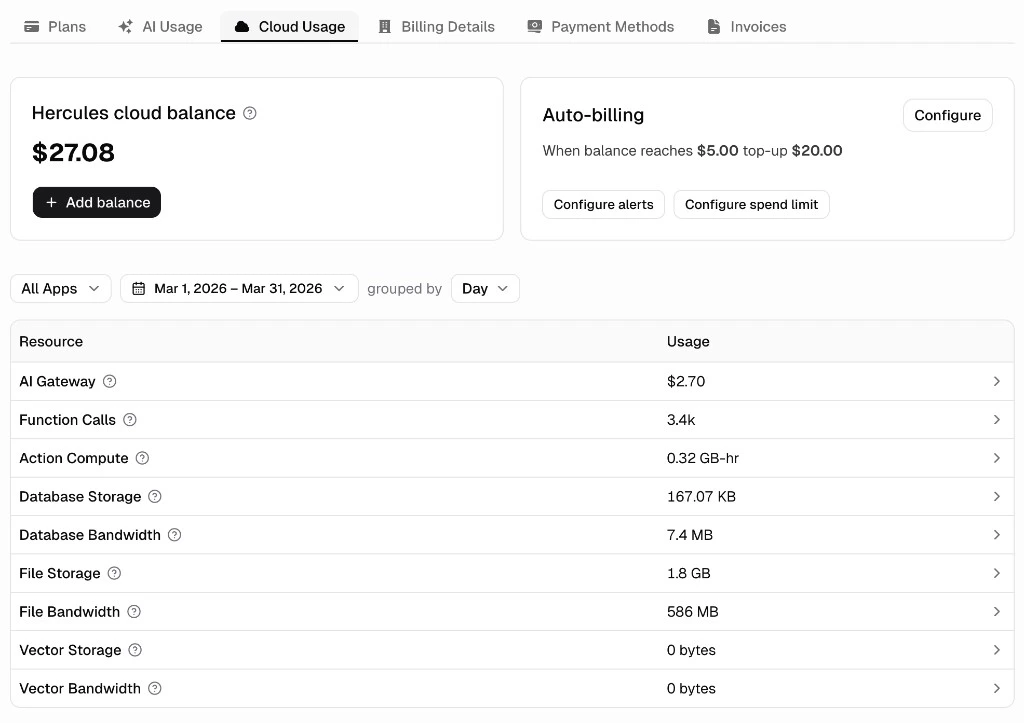
Cloud credits (your Cloud Balance) cover any usage beyond your plan's included limits and any AI inference triggered by your live app through the Hercules AI Gateway.

To see your usage and manage your cloud credits, go to **Settings** → **Billing** → **Hercules Cloud**.

<div className="screenshot emerald">
  <img src="https://mintcdn.com/zeus-0f6dadbf/cwXoac_6SW2YHbZV/images/platform/cloud-usage.png?fit=max&auto=format&n=cwXoac_6SW2YHbZV&q=85&s=2de7b20c888d0ec12001c9ef01e17d57" alt="Cloud Usage dashboard with balance, auto top-ups, and resource usage table" width="1024" height="723" data-path="images/platform/cloud-usage.png" />
</div>

### How are cloud credits different from AI credits?

* **AI credits** are included with your subscription and are used while **building** your app (generating, editing, debugging with the Hercules AI Agent). See [AI Credits](/platform/billing/ai-credits).
* **Cloud credits** are used once your app is **running**. They cover hosting overages and any AI inference triggered by your live app through the Hercules AI Gateway.

Because they are separate, your Cloud Balance can go negative even if you still have AI credits remaining.

### How much does Hercules Cloud cost?

Your Hercules subscription plan includes a very generous amount of free usage each month. Any additional usage beyond that is charged at a low pay-as-you-go rate.

<table style={{ textAlign: "left" }}>
  <thead>
    <tr>
      <th style={{ textAlign: "left", verticalAlign: "middle" }}>Metric</th>
      <th style={{ textAlign: "left", verticalAlign: "middle" }}>Free</th>
      <th style={{ textAlign: "left", verticalAlign: "middle" }}>Pro</th>
      <th style={{ textAlign: "left", verticalAlign: "middle" }}>Business</th>
    </tr>
  </thead>

  <tbody>
    <tr>
      <td style={{ textAlign: "left", verticalAlign: "middle" }}>
        <Tooltip tip="Backend requests from your app and scheduled jobs">Function calls</Tooltip>
      </td>

      <td style={{ textAlign: "left", verticalAlign: "middle" }}>200k/month</td>

      <td style={{ textAlign: "left", verticalAlign: "middle" }}>
        5M/month

        <br />

        <span style={{ opacity: 0.7 }}>Then {"$"}2.50 / million</span>
      </td>

      <td style={{ textAlign: "left", verticalAlign: "middle" }}>
        5M/month

        <br />

        <span style={{ opacity: 0.7 }}>Then {"$"}2.50 / million</span>
      </td>
    </tr>

    <tr>
      <td style={{ textAlign: "left", verticalAlign: "middle" }}>
        <Tooltip tip="Storage for uploaded files and backups">File storage</Tooltip>
      </td>

      <td style={{ textAlign: "left", verticalAlign: "middle" }}>1 GB/month</td>

      <td style={{ textAlign: "left", verticalAlign: "middle" }}>
        100 GB/month

        <br />

        <span style={{ opacity: 0.7 }}>Then {"$"}0.035 / GB-month</span>
      </td>

      <td style={{ textAlign: "left", verticalAlign: "middle" }}>
        100 GB/month

        <br />

        <span style={{ opacity: 0.7 }}>Then {"$"}0.035 / GB-month</span>
      </td>
    </tr>

    <tr>
      <td style={{ textAlign: "left", verticalAlign: "middle" }}>
        <Tooltip tip="Storage for your app's saved data, excluding files">Database storage</Tooltip>
      </td>

      <td style={{ textAlign: "left", verticalAlign: "middle" }}>500 MB/month</td>

      <td style={{ textAlign: "left", verticalAlign: "middle" }}>
        25 GB/month

        <br />

        <span style={{ opacity: 0.7 }}>Then {"$"}0.27 / GB-month</span>
      </td>

      <td style={{ textAlign: "left", verticalAlign: "middle" }}>
        25 GB/month

        <br />

        <span style={{ opacity: 0.7 }}>Then {"$"}0.27 / GB-month</span>
      </td>
    </tr>

    <tr>
      <td style={{ textAlign: "left", verticalAlign: "middle" }}>
        <Tooltip tip="Data read from and written to your database">Database bandwidth</Tooltip>
      </td>

      <td style={{ textAlign: "left", verticalAlign: "middle" }}>1 GB/month</td>

      <td style={{ textAlign: "left", verticalAlign: "middle" }}>
        25 GB/month

        <br />

        <span style={{ opacity: 0.7 }}>Then {"$"}0.27 / GB</span>
      </td>

      <td style={{ textAlign: "left", verticalAlign: "middle" }}>
        25 GB/month

        <br />

        <span style={{ opacity: 0.7 }}>Then {"$"}0.27 / GB</span>
      </td>
    </tr>

    <tr>
      <td style={{ textAlign: "left", verticalAlign: "middle" }}>
        <Tooltip tip="Storage for AI embeddings used in semantic search and retrieval">Vector embedding storage</Tooltip>
      </td>

      <td style={{ textAlign: "left", verticalAlign: "middle" }}>100 MB/month</td>

      <td style={{ textAlign: "left", verticalAlign: "middle" }}>
        1 GB/month

        <br />

        <span style={{ opacity: 0.7 }}>Then {"$"}0.70 / GB-month</span>
      </td>

      <td style={{ textAlign: "left", verticalAlign: "middle" }}>
        1 GB/month

        <br />

        <span style={{ opacity: 0.7 }}>Then {"$"}0.70 / GB-month</span>
      </td>
    </tr>

    <tr>
      <td style={{ textAlign: "left", verticalAlign: "middle" }}>
        <Tooltip tip="AI embedding data read from and written to storage">Vector embedding bandwidth</Tooltip>
      </td>

      <td style={{ textAlign: "left", verticalAlign: "middle" }}>500 MB/month</td>

      <td style={{ textAlign: "left", verticalAlign: "middle" }}>
        5 GB/month

        <br />

        <span style={{ opacity: 0.7 }}>Then {"$"}0.14 / 1,000 query-GBs</span>
      </td>

      <td style={{ textAlign: "left", verticalAlign: "middle" }}>
        5 GB/month

        <br />

        <span style={{ opacity: 0.7 }}>Then {"$"}0.14 / 1,000 query-GBs</span>
      </td>
    </tr>

    <tr>
      <td style={{ textAlign: "left", verticalAlign: "middle" }}>
        <Tooltip tip="Data sent out of your app, including file downloads and data sent to other APIs">Data egress</Tooltip>
      </td>

      <td style={{ textAlign: "left", verticalAlign: "middle" }}>1 GB/month</td>

      <td style={{ textAlign: "left", verticalAlign: "middle" }}>
        50 GB/month

        <br />

        <span style={{ opacity: 0.7 }}>Then {"$"}0.16 / GB</span>
      </td>

      <td style={{ textAlign: "left", verticalAlign: "middle" }}>
        50 GB/month

        <br />

        <span style={{ opacity: 0.7 }}>Then {"$"}0.16 / GB</span>
      </td>
    </tr>

    <tr>
      <td style={{ textAlign: "left", verticalAlign: "middle" }}>
        <Tooltip tip="Total time your Node actions spend running">Action compute (Node runtime)</Tooltip>
      </td>

      <td style={{ textAlign: "left", verticalAlign: "middle" }}>2 GB-hr/month</td>

      <td style={{ textAlign: "left", verticalAlign: "middle" }}>
        25 GB-hr/month

        <br />

        <span style={{ opacity: 0.7 }}>Then {"$"}0.42 / GB-hr</span>
      </td>

      <td style={{ textAlign: "left", verticalAlign: "middle" }}>
        25 GB-hr/month

        <br />

        <span style={{ opacity: 0.7 }}>Then {"$"}0.42 / GB-hr</span>
      </td>
    </tr>

    <tr>
      <td style={{ textAlign: "left", verticalAlign: "middle" }}>
        <Tooltip tip="Total time your V8 actions spend running">Action compute (V8 runtime)</Tooltip>
      </td>

      <td style={{ textAlign: "left", verticalAlign: "middle" }}>2 GB-hr/month</td>

      <td style={{ textAlign: "left", verticalAlign: "middle" }}>
        25 GB-hr/month

        <br />

        <span style={{ opacity: 0.7 }}>Then {"$"}0.21 / GB-hr</span>
      </td>

      <td style={{ textAlign: "left", verticalAlign: "middle" }}>
        25 GB-hr/month

        <br />

        <span style={{ opacity: 0.7 }}>Then {"$"}0.21 / GB-hr</span>
      </td>
    </tr>

    <tr>
      <td style={{ textAlign: "left", verticalAlign: "middle" }}>
        <Tooltip tip="AI model usage routed through Hercules. Learn more in the AI Gateway page"> AI Gateway</Tooltip>
      </td>

      <td style={{ textAlign: "left", verticalAlign: "middle" }}>Pay as you go</td>
      <td style={{ textAlign: "left", verticalAlign: "middle" }}>Pay as you go</td>
      <td style={{ textAlign: "left", verticalAlign: "middle" }}>Pay as you go</td>
    </tr>
  </tbody>
</table>

<Info>Need custom limits? Contact us for [Enterprise](/platform/enterprise) pricing.</Info>

### How far will the included limits get me?

The included limits will allow you to scale very far. 99% of our paid users don't pay a cent for Hercules Cloud. Hercules has customers building large scale internal tools for their business, mobile apps that go viral, and AI video editor infrastructure. These users are all covered by Hercules's generous limits.

If you are concerned, please reach out to Hercules support who can give you guidance.

### How do I analyze my usage?

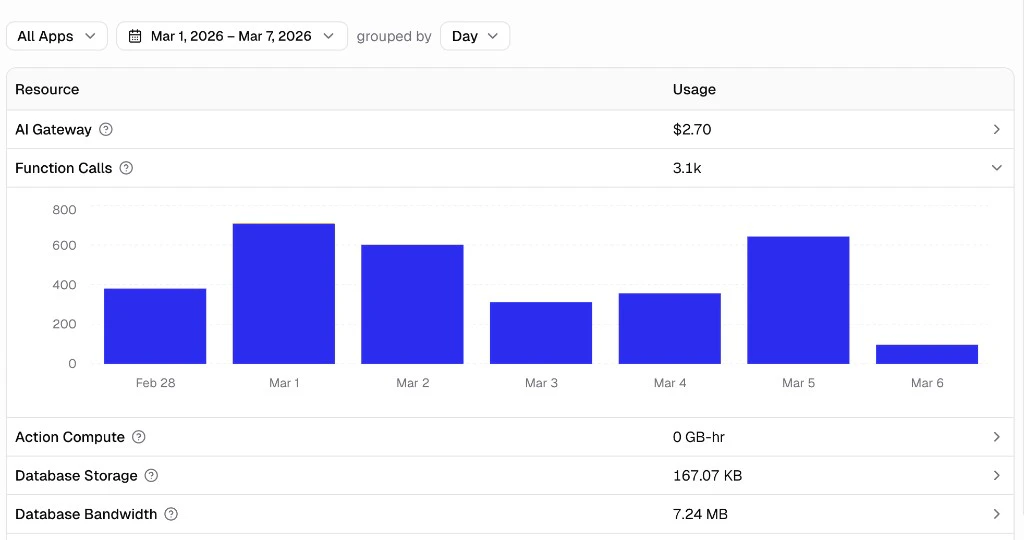
Go to **Settings** → **Billing** → **Hercules Cloud** to see your usage. You can filter your usage by feature, date range, and app.

<div className="screenshot slate">
  <img src="https://mintcdn.com/zeus-0f6dadbf/cwXoac_6SW2YHbZV/images/platform/cloud-usage-metric-detail.png?fit=max&auto=format&n=cwXoac_6SW2YHbZV&q=85&s=80683e8edf331cd02dcfd7c0d07de54b" alt="Hercules Cloud usage dashboard showing resource breakdown by app with a bar chart for Function Calls" width="1024" height="540" data-path="images/platform/cloud-usage-metric-detail.png" />
</div>

### How do I add to my cloud credit balance?

There are two ways to add to your cloud credit balance:

**Auto top-ups**

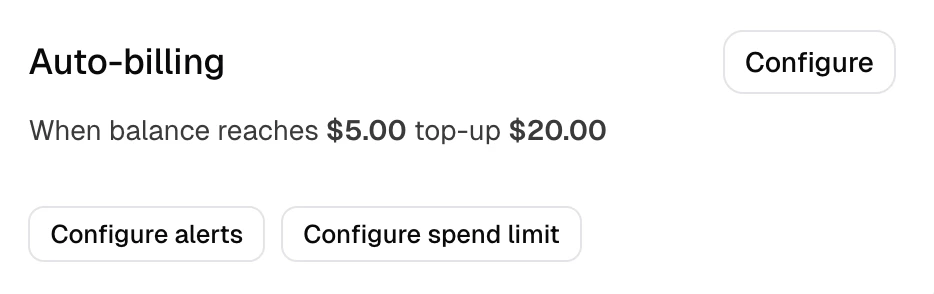
Use auto top-ups to automatically increase your cloud credit balance when your balance is low.

1. Go to **Settings** → **Billing** → **Hercules Cloud**
2. Click **Configure** in the Auto billing card
3. Set a threshold (the balance at which a top-up triggers) and the amount to add each time.
4. (Optional) Set alerts to get notified when usage or spend reaches a certain level.

<div className="screenshot candy">
  <img src="https://mintcdn.com/zeus-0f6dadbf/cwXoac_6SW2YHbZV/images/platform/cloud-auto-top-ups.png?fit=max&auto=format&n=cwXoac_6SW2YHbZV&q=85&s=1e8d42e4500d958aea7d7b84437ff32a" alt="Auto top-ups dialog with fields for balance threshold and top-up amount" width="934" height="294" data-path="images/platform/cloud-auto-top-ups.png" />
</div>

**Manually**

1. Go to **Settings** → **Billing** → **Hercules Cloud**
2. Click **Add balance**
3. Choose an amount and pay once.

<div className="screenshot slate">
  <img src="https://mintcdn.com/zeus-0f6dadbf/cwXoac_6SW2YHbZV/images/platform/cloud-add-balance.png?fit=max&auto=format&n=cwXoac_6SW2YHbZV&q=85&s=9c986feaa565e53024177d6bc49f5f41" alt="Hercules Cloud balance card showing current balance and Add balance button" width="928" height="300" data-path="images/platform/cloud-add-balance.png" />
</div>

### Can Hercules Cloud scale?

Hercules Cloud can scale up and down as much as you need. All Hercules apps are deployed on "serverless" architecture (even your database). This means Hercules apps can scale to millions of users seamlessly and scale down to 0 if not being used.

### How do I reduce my Hercules Cloud usage and spend?

Run the **Hercules Cloud** audit.

1. Open the [Audits](/apps/audits) tab
2. Click **Run Audit** on the Hercules Cloud Audit.

Hercules will deep dive into your backend, finds what's driving costs, and then get your confirmation before implementing a fix.

Here are some more specific instructions you can follow for each resource type

<AccordionGroup>
  <Accordion title="How do I reduce database bandwidth usage?">
    Database bandwidth is the data transferred from and to your database. You can reduce database bandwidth by following these instructions:

    * Reduce the frequency of scheduled tasks
    * Only load the fields you actually use, not entire rows
    * Add pagination to lists so you don't load thousands of records at once
    * Cache results you fetch repeatedly instead of re-querying each time
    * Add indexes on columns you filter or sort by often
    * Avoid N+1 queries (loading related records one-by-one in a loop)

    ```text Ask Hercules to reduce database bandwidth wrap theme={}
    Audit my app and reduce database bandwidth. Look for unnecessary fields being loaded, missing pagination, repeated queries, missing indexes, and N+1 query patterns. Fix each issue you find without causing any functional changes.
    ```
  </Accordion>

  <Accordion title="How do I reduce action compute?">
    Action compute is the total time your backend functions spend running. You can reduce action compute by following these instructions:

    * Reduce the frequency of scheduled tasks
    * Cache responses from external APIs instead of calling them on every request
    * Batch multiple operations into one instead of running them one-by-one
    * Move filtering and sorting to the database layer rather than in code
    * Avoid doing heavy work inside loops

    ```text Ask Hercules to reduce action compute wrap theme={}
    Audit my app and reduce backend action compute usage. Look for repeated external API calls that could be cached or run less frequently, overly frequent scheduled tasks, unbatched operations, in-memory filtering that could be done with database filtering, and heavy work inside loops. Fix each issue you find.
    ```
  </Accordion>
</AccordionGroup>

### Additional FAQ

<AccordionGroup>
  <Accordion title="How reliable is Hercules Cloud?">
    Hercules Cloud is built on Cloudflare, AWS, and Convex. These are enterprise-grade infrastructure providers with some of the highest reliability, security, scalability in the world.

    We host thousands of production applications and take reliability seriously. If you ever experience any issues, our support team is available to help resolve them quickly.
  </Accordion>

  <Accordion title="Can I host my app on another cloud provider?">
    We strongly recommend hosting on Hercules Cloud. Hercules apps are optimized for hosting on Hercules Cloud. As we shared above, 99% of our paid customers don't pay a cent for hosting.  That said, you can download your app's code at any time and self-host it on any provider you choose. Unfortunately, Hercules is unable to provide support for self-hosted deployments.
  </Accordion>

  <Accordion title="What happens if my usage goes over my monthly included limit?">
    Hercules will automatically alert you when you have used 50%, 75%, 90%, and 100% of your included monthly limits so you're never caught off guard.

    If you go over your limit, Hercules reserves the right to pause your app. To date, we have not paused any user apps when this has happened. Someone from our team will get in contact with you immediately and we do everything we can to keep your app running, however, understandably if your costs are ballooning rapidly and you have not gotten in contact with us we will have temporarily pause your app.

    To avoid disruptions:

    * **Set up auto top-ups** so your cloud credit balance refills automatically
    * **Contact us before a big launch** so we can adjust your limits in advance
    * **Contact us if you're expecting a traffic spike** and we'll make sure you're covered.
  </Accordion>

  <Accordion title="Why am I seeing a negative Cloud Balance if I still have AI credits?">
    AI credits and Cloud Balance are separate and are used in different parts of Hercules.

    AI credits are included with your subscription and are used while building your app (generating, editing, debugging).

    Cloud Balance is used once your app is running. It covers hosting overages and any AI inference triggered by your app through the Hercules AI Gateway.

    Your subscription includes certain hosting and usage limits. If those limits are exceeded or if your live app makes AI requests, those costs are applied to your Cloud Balance.

    Because of this, your Cloud Balance can go negative even if you still have AI credits remaining.
  </Accordion>
</AccordionGroup>