
Agents is in private beta, so things may change. If you hit a problem, tell us via Support &
feedback.
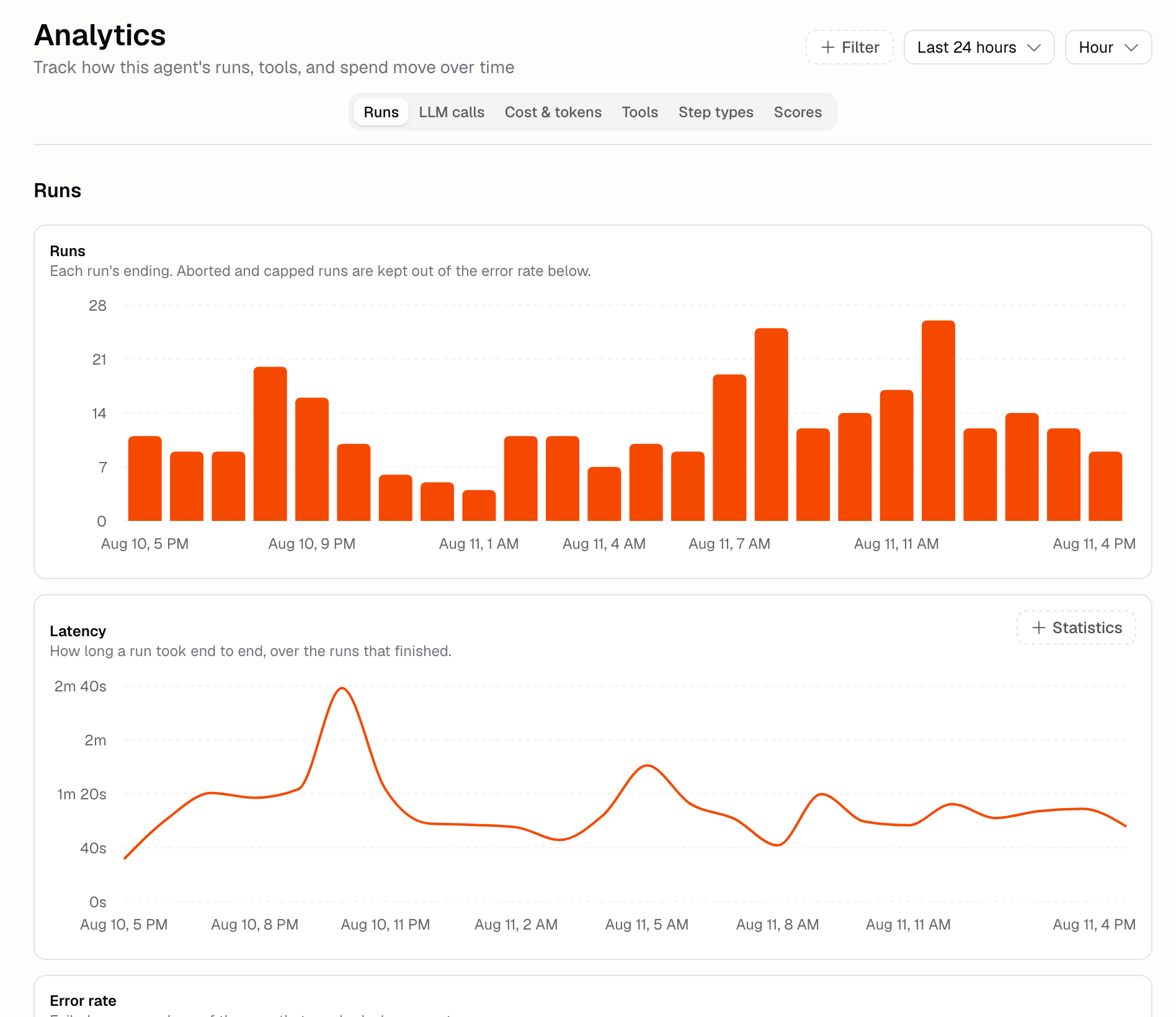
What do the charts show?
The page has six sections. Use the tabs at the top to move between them, and the controls beside the heading to change the dates. Filter narrows every chart to a trigger, a version, or a model.
Runs you stopped yourself, and runs stopped by a limit, don’t count as failures, but they’re still part of the total the failure rate is measured against. Timings only count runs that finished.
How do I compare all my Agents?
Go to Agents → Analytics in the sidebar. It ranks every Agent in your Organization over the dates you pick:- Totals for spend, runs, active Agents, error rate, and run time
- A table of every Agent, sorted by spend by default. Sort by any column, and click an Agent to open its own Analytics
- Spend and runs over time for your busiest Agents, with the rest grouped as Other agents
- Runs by trigger, spend by source and by model, and the tools your Agents call most
Why is my spend higher than the runs chart suggests?
Because runs aren’t the only thing that costs credits. Spend by source, under the Cost charts, splits your spend into runs and everything else: Auto-improve, scoring real runs, and run summaries. The other charts only count runs, so this is where the rest shows up.How do I bring costs down?
- Cap a single run under Build → More → Run limits
- Drop the model tier if the Agent’s job doesn’t need the top one
- Remove tools the Agent doesn’t use
- Grade fewer real runs, or turn that off completely
- Put a credit cap on Auto-improve
Additional FAQ
What counts as a failed run?
What counts as a failed run?
A run that finished and failed. Runs you stopped yourself, and runs stopped by a limit, aren’t
counted as failures, though they’re still in the total the rate is measured against. Only runs
that never reached a known ending are left out altogether.
Where do I see credits for my whole Organization?
Where do I see credits for my whole Organization?
On the AI Credits page. Agents → Analytics covers what
your Agents spent; AI Credits also covers apps and chat.
My Agent is slow. What do I check?
My Agent is slow. What do I check?
Open a slow run in Run history and read back through its steps. You’ll see
whether the time went on the model or on one of the tools, and the Tools section here shows
which tool is slow across every run.
The Scores section is empty
The Scores section is empty
Nothing has graded a real run yet. Turn on grading for a scorer that doesn’t
need an expected answer.