
How do I add internationalization?
Tell Hercules with a prompt like:Add internationalization
How does it work?
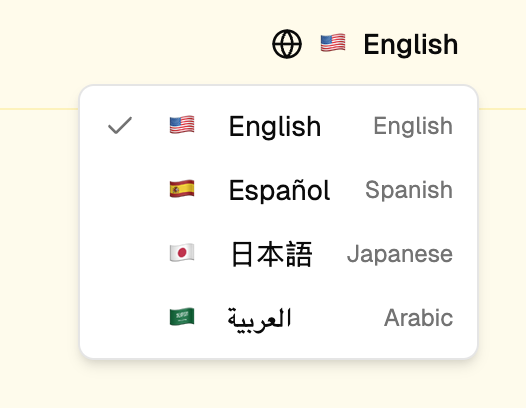
Once internationalization is enabled, your app will:- Show a language switcher: Users use a dropdown to select their preferred language from anywhere in your app
- Prefix URLs with the locale: Your URLs will always include the language code e.g.
myapp.com/becomesmyapp.com/enmyapp.com/aboutbecomesmyapp.com/en/about
- Serve translated content: All text content will be displayed in the user’s chosen language
What languages can Hercules support?
Hercules comfortably supports the top 100 languages including English, French, Spanish, German, Arabic, Chinese, Japanese, Portuguese, and many more.When should I add internationalization?
We recommend adding internationalization after finalizing your text content. Translations cost credits to generate. It’s more efficient to finalize your copy first, then translate everything in one go rather than re-translating every time you make a change. Recommended approach:- Build and finalize your app in your base language
- Review all copy and make final edits
- Add internationalization and translate to all target languages at once
Additional FAQ
Can it support right-to-left (RTL) languages?
Can it support right-to-left (RTL) languages?
Yes. Hercules fully supports right-to-left languages like Arabic, Hebrew, and Persian. When a user selects an RTL language, your app’s layout will automatically adjust.
Can it format numbers and dates for different locales?
Can it format numbers and dates for different locales?
Yes. Just tell Hercules the formatting standards you want and it will follow them. This includes
number formats (1,000 vs 1.000), date formats (MM/DD/YYYY vs DD/MM/YYYY), and currency symbols.
Will Hercules keep translations up to date?
Will Hercules keep translations up to date?
Yes. Once internationalization is set up, Hercules will try to keep translations up to date when
you make changes to your content. However, for the most cost-effective approach, we recommend
batching content changes before triggering new translations.
Can I manually edit translations?
Can I manually edit translations?
Yes. Tell Hercules any specific translations you’d like to override to ensure it matches your brand voice and terminology.